Automated Dunning Emails: Templates, Timing & Sequences That Work

Most failed payments are recoverable. The customer's card expired, the bank flagged an unusual charge, an ACH transfer missed a routing update. The payment didn't fail because the customer doesn't want to pay — it failed because something broke in the collection chain.
Whether you recover that payment depends almost entirely on what you do in the next 72 hours. The right message at the right time, to the right contact, recovers most of them automatically. The wrong sequence — generic reminders on a fixed schedule — recovers far fewer and damages the customer relationship in the process.
This guide covers the dunning sequence that works for B2B SaaS: the five emails, the timing logic, what each one should say, and how to automate the whole sequence without manual intervention.
What is a dunning sequence?
A dunning sequence is a structured series of communications sent to a customer when a payment fails or an invoice goes overdue. The sequence typically runs from a gentle first notice through increasingly direct reminders, ending in an escalation or account action if payment is not received.
The term comes from 'dunning' — the process of requesting payment on an overdue debt. In B2B SaaS, a dunning sequence is not a collections process in the aggressive sense. It is a systematic follow-up workflow that handles the most common payment failure scenarios without a human managing each one.
A well-designed automated dunning sequence does three things: it recovers the payment without requiring a finance team member to chase it manually, it preserves the customer relationship by matching tone to the situation, and it creates a clear escalation path for cases that the automated sequence cannot resolve.
How much revenue do failed payments cost? For a SaaS company doing $2M ARR, a 2% monthly payment failure rate means $40,000 in invoices that fail every month. Most of those failures are technical — expired cards, ACH returns, routing updates — and industry benchmarks suggest 60-80% are recoverable with prompt, well-timed follow-up. Without an automated sequence, many of those recoveries never happen — the invoice sits in an AR queue until someone has time to look at it.
The five-stage dunning sequence — emails, timing, and purpose
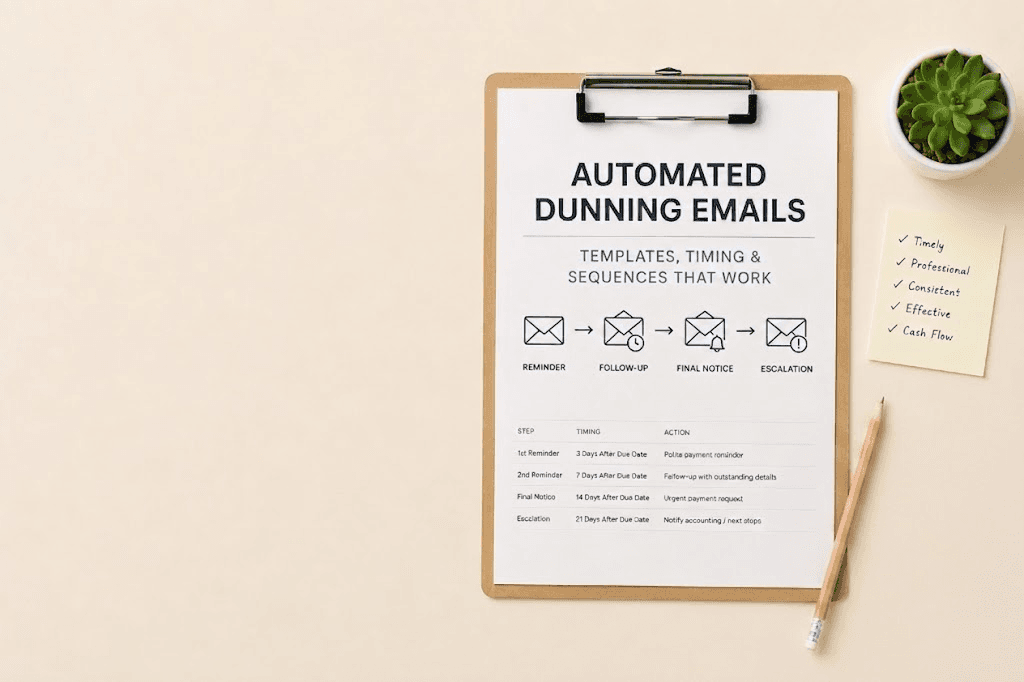
Here is the sequence structure that recovers the most payments while maintaining the customer relationship. Each stage has a specific purpose — do not compress the timeline or skip stages.
Stage 1 — Payment failure notice (Day 1, within 2 hours of failure)
Purpose: Inform the customer of the failure immediately, before they hear about it another way (a declined payment at a vendor, a service interruption). Tone: factual, neutral, non-accusatory.
| What to include | What to avoid |
|---|---|
| The specific invoice number and amount that failed | 'Your account is overdue' — it just failed, not overdue yet |
| The reason for failure if known (expired card, insufficient funds) | Threatening language or service suspension warnings |
| A direct link to update payment details or retry | Multiple questions — one clear action only |
| A name and direct contact if they have questions | CC-ing their manager or escalating on day 1 |
Day 1 template
Subject: Payment issue on Invoice #[NUMBER] — action needed

Hi [Name],

A payment of [AMOUNT] for Invoice #[NUMBER] didn't go through on [DATE]. This can happen when a card expires or a bank flags an unusual charge — it usually takes 2 minutes to fix.

Update your payment details here: [LINK]

Once updated, we'll retry the charge automatically. If you have any questions, reply to this email and I'll sort it out.

[Your name], [Company]
Stage 2 — Soft reminder (Day 3)
Purpose: A gentle follow-up for customers who haven't acted on the day 1 notice. Most customers who are going to self-resolve do so by day 3. Tone: helpful, assumes good intent.
Day 3 template
Subject: Quick follow-up on Invoice #[NUMBER]

Hi [Name],

Just following up on the payment issue from [DATE]. We haven't been able to process [AMOUNT] for Invoice #[NUMBER] yet.

If it's easier, you can pay directly via bank transfer — details below — or update your card here: [LINK]

Let me know if anything's unclear.

[Your name], [Company]
Stage 3 — Direct notice (Day 7)
Purpose: This is the first email where the tone becomes clearly about an overdue balance rather than a technical issue. The customer has had a week. The language shifts from 'there was a payment issue' to 'your invoice is now overdue.' Tone: direct, professional, still not threatening.
Day 7 template
Subject: Invoice #[NUMBER] — [AMOUNT] overdue

Hi [Name],

Invoice #[NUMBER] for [AMOUNT] is now 7 days overdue. We've reached out twice and haven't heard back.

Please settle this invoice by [DATE + 3 days]: [PAYMENT LINK]

If there's a billing dispute or you need to discuss payment timing, reply to this email and we'll work something out. We'd prefer to resolve this directly.

[Your name], [Company]
Stage 4 — Final notice (Day 14)
Purpose: Last automated email before the case escalates to human review or account action. Clear statement of consequence without being aggressive. Tone: firm, factual.
Day 14 template
Subject: Final notice — Invoice #[NUMBER] requires immediate payment

Hi [Name],

This is our final notice regarding Invoice #[NUMBER] for [AMOUNT], now 14 days overdue.

Please make payment by [DATE + 2 days] to avoid service interruption: [PAYMENT LINK]

If you're experiencing financial difficulty or need to discuss a payment plan, contact us at [EMAIL] before [DATE] and we'll do our best to find a solution.

[Your name], [Company]
Stage 5 — Escalation or account action (Day 21)
Purpose: This stage is not another copy-paste email for most accounts. For high-value or strategic customers, day 21 should be a direct phone call from someone on the finance or customer success team — not an automated message. For standard accounts, a brief escalation email can notify the customer that the case is moving to human review.
At day 21, the automated sequence ends. The case moves to the human review queue with the full interaction history attached — every email sent, every response, the payment history, and the CRM status.
Day 21 — escalation email (optional; prefer a phone call for strategic accounts)
Subject: Invoice #[NUMBER] — account requires immediate attention

Hi [Name],

We've sent four notices regarding Invoice #[NUMBER] for [AMOUNT], now 21 days overdue, without receiving payment or a response.

I'm reaching out directly to understand what's blocking payment and whether we need to adjust terms, resolve a dispute, or discuss next steps before any account action.

Please reply to this email or call [PHONE] by [DATE + 2 days] so we can resolve this together.

[Your name], [Company]
The timing logic — why spacing matters
The day 1 / 3 / 7 / 14 / 21 cadence is not arbitrary. Each interval serves a specific purpose:
-
Day 1 (immediate): Catches the large group of customers whose payment failed for a technical reason and will fix it as soon as they know. The faster you tell them, the faster they act.
-
Day 3: Catches customers who saw the day 1 email but haven't acted yet. A short interval here recovers a second wave before the invoice ages further.
-
Day 7: The tone shift. A week of silence after two contacts means this is not a technical issue — something needs to be resolved. The language changes accordingly.
-
Day 14: Final automated notice. Long enough after day 7 to give the customer time to respond, short enough that the debt hasn't aged to the point where recovery becomes difficult.
-
Day 21: Escalation. Three weeks of non-response with four contacts is a clear signal that the automated sequence cannot resolve this case.
Adjust timing per customer — not per account type
A customer who has paid on time for 18 months and misses a payment is statistically likely to resolve on day 1 or day 3. Running them through the full 21-day sequence at the standard cadence is both unnecessary and relationship-damaging. A well-configured automated system adjusts the timing based on payment history — tightening the follow-up for new or high-risk accounts, giving reliable customers more time.
The elements every dunning email needs
Regardless of which stage in the sequence, every dunning email should contain:
-
Specific invoice reference: Invoice number, amount, and due date — not 'your recent invoice.' The customer may have multiple open invoices. Make it specific so they can act immediately.
-
One clear action: One payment link, one email address to reply to. Multiple options cause paralysis. One action causes resolution.
-
A human name: Emails from 'billing@company.com' perform worse than emails from a named person. The customer is more likely to reply to Sarah than to an inbox.
-
A reply path for disputes: Every dunning email should make it easy for a customer to flag a dispute or question. A customer who can raise a dispute easily is less likely to simply ignore the invoice.
-
Appropriate tone for the stage: Day 1 is helpful. Day 7 is direct. Day 14 is firm. The tone should escalate with the sequence — not jump from helpful to threatening.
Automate the sequence — how JustPaid handles it
Building this sequence manually — writing the emails, setting the timing, logging each contact, managing responses — works at 50 customers. It breaks at 200. At 500, it's impossible to do consistently.
JustPaid automates the full dunning sequence for every invoice, adjusting the timing and tone per customer based on their payment history. Failed payments are detected immediately and the sequence starts within minutes of the failure — not the next morning when someone checks the AR report.
The sequence runs automatically through day 14. Cases that reach day 21 without resolution surface to the human review queue with the full interaction log attached — every contact sent, every response, the payment history, and the invoice detail. The finance team handles exceptions, not the whole sequence.
Frequently asked questions
Get Started with JustPaid
Automate invoicing, streamline accounts receivable, and accelerate revenue with JustPaid. Compare JustPaid pricing plans or book a walkthrough.